
Video Style Transfer: Turn Any Video into a New Visual Style
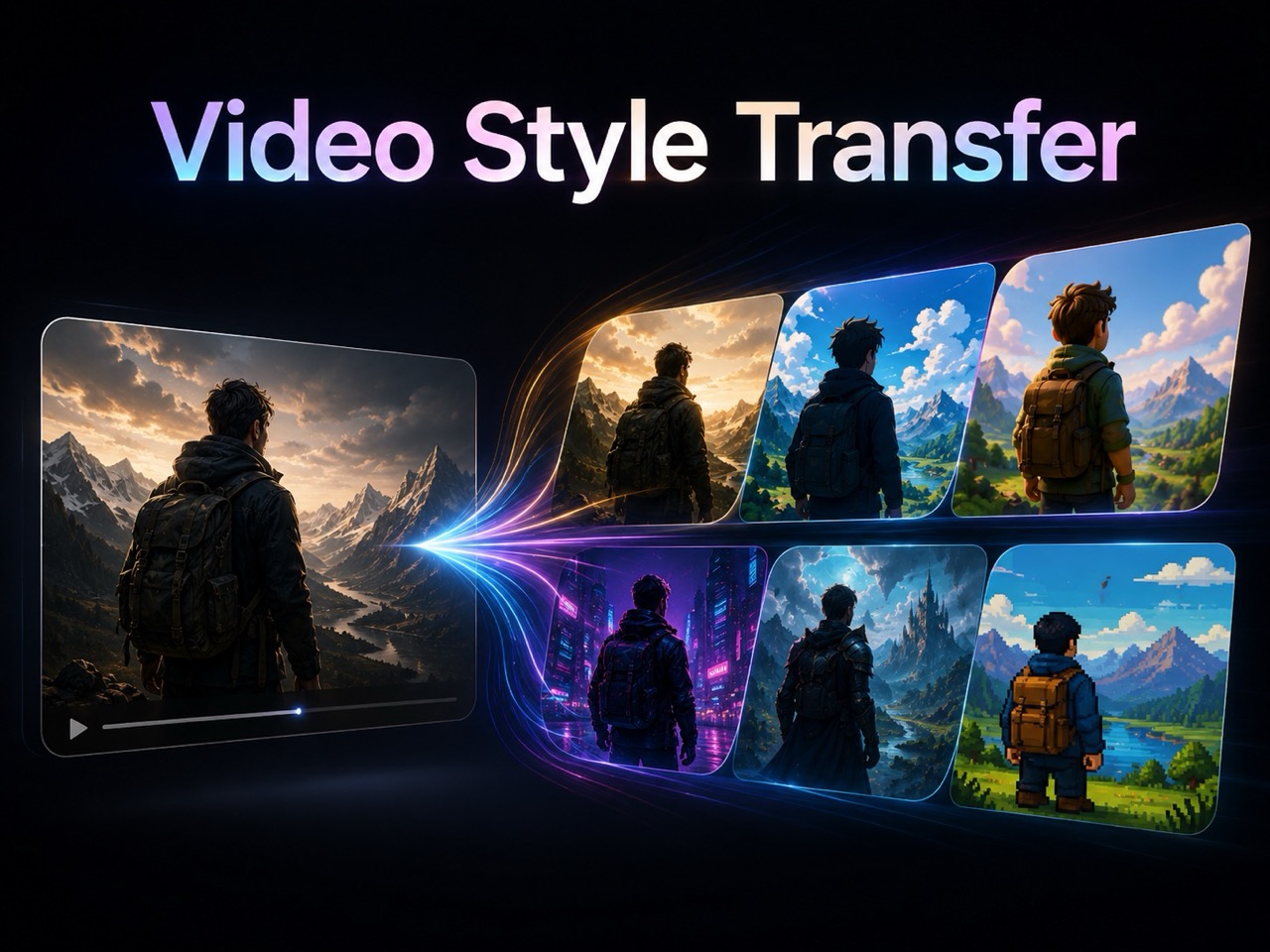
Upload a clip, choose a look, and use Video Style Transfer to restyle motion into anime, cinematic film, cyberpunk, fantasy, realistic CGI, Lego Style, pixel art, and more.
Video Style Transfer changes the appearance of your uploaded footage while keeping the subject, action, framing, and timing clear. Use an AI video filter to apply AI video effects across the whole clip, from cartoon looks to cinematic color, without rebuilding the scene from scratch.
How to Use Video Style Transfer in 3 Steps
The workflow is simple: upload your video, choose a style, and generate. This is a direct way to try video style transfer free online, compare video to video style transfer results, explore ai video style transfer tools, and restyle video with AI. It also works well when you want to test a visual idea before building a longer edit, because the core input remains your own footage.

Upload Your Video
Start Video Style Transfer by uploading the source clip you want to change. A clear video with visible subjects helps the AI video filter preserve identity, motion, and scene structure.

Choose a Video Style
Select a look such as Cinematic Film, Anime, 3D Cartoon, Cyberpunk, Oil Painting, Pixel Art, Realistic CGI, Fantasy, or Lego Style. Video Style Transfer uses the chosen style to guide AI video effects.

Generate Your Styled Video
Click Generate Video to create the restyled result. Video Style Transfer applies the AI video filter while keeping the original action, timing, camera movement, and main composition.
What Video Style Transfer Helps You Create
Video Style Transfer gives existing footage a new visual identity. Use it as a creative AI video filter for AI video effects that change mood, texture, color, and presentation while keeping the source clip recognizable.
Change the Look Without Reshooting
Video Style Transfer is useful when the clip already has the right motion, face, product, or scene, but the look feels unfinished. Apply an AI video filter to shift color, texture, lighting, and rendering style while preserving the performance. These AI video effects can help one source video become multiple creative versions for social posts, concept previews, campaign tests, and storyboards. For creators searching video style transfer free online, the value is speed: you can test a new mood without planning another shoot. Video Style Transfer keeps the original moment and changes the visual language around it. This is useful for creators who need several versions of the same message for different audiences.

Test Creative Directions Before Editing
A single clip can become anime, cyberpunk, oil painting, pop art, pixel art, claymation, or cinematic film. Video Style Transfer helps you compare moods before choosing a final direction. An AI video filter can make a scene feel playful, premium, nostalgic, futuristic, or hand-painted. These AI video effects are useful for thumbnails, ads, music visuals, product shots, and creator edits. Teams researching video to video style transfer can review several looks from the same footage instead of guessing which style fits the audience. Video Style Transfer turns style choice into a fast visual decision. This helps when a team has many ideas but limited source material.

Keep Motion Clear While the Style Changes
The goal of Video Style Transfer is not to cover a clip with a random overlay. It should keep the action readable while changing surface style, atmosphere, outlines, shadows, and texture. That matters for dance clips, product demos, portraits, travel shots, character scenes, and tutorials. When you restyle video with AI, the viewer still needs to understand the motion. A controlled AI video filter supports that clarity, and AI video effects can make the footage feel fresh without breaking the story. Video Style Transfer helps the final clip look stylized, not confusing. The best results come from clips where the main subject is easy to see and the visual goal is clear.
Who Uses Video Style Transfer?
Video Style Transfer is for creators, marketers, artists, and editors who want to change style without changing the source action. It brings AI video filter choices and AI video effects into one focused workflow.
Short-Form Creators
Video Style Transfer helps creators make familiar clips feel new. Turn a selfie video, dance clip, travel moment, or reaction into anime, cartoon, cyberpunk, or fantasy. An AI video filter gives you a clear style target, while AI video effects make the result more eye-catching for feeds and shorts. Many creators look for video style transfer free online because they want fast visual variety without complex editing. Video Style Transfer supports that need with a simple upload, style, and generate flow. This workflow also helps when a creator wants to keep audience focus on the same moment while testing a new mood.

Marketing Teams
Marketing teams can use Video Style Transfer to test campaign angles from one source clip. A product video can become cinematic, playful, futuristic, painterly, or bold. The AI video filter helps define the style, and AI video effects help create different creative routes for ads, landing pages, teasers, and social posts. For video to video style transfer workflows, this gives teams a faster way to compare tone before choosing final assets. It is especially helpful when a campaign needs creative testing before budgets move into production. The same clip can support multiple concepts, making feedback easier for clients, teammates, or stakeholders.

Artists and Designers
Artists can use Video Style Transfer to see how motion works inside a visual language. Try watercolor, oil painting, pop art, pixel art, realistic CGI, or sketch-inspired looks. This helps when comparing ai video style transfer tools or building moving mood references. Instead of describing a style in abstract terms, you can generate a visible version. Video Style Transfer helps designers evaluate whether a scene should feel graphic, painterly, cinematic, retro, or surreal. For early planning, moving previews can reveal whether a style supports the emotion, pacing, and audience expectation.

Editors and Storytellers
Editors can use Video Style Transfer when a shot has the right performance but the wrong mood. Restyle video with AI to explore noir, fantasy, anime, comic, or CGI looks before committing to a direction. The process supports video to video style transfer because the uploaded clip remains the foundation. An AI video filter gives the scene a new surface, while AI video effects help shape tone. Video Style Transfer can be a practical preview step before heavier post-production. This gives storytellers a flexible way to explore emotion. A cheerful clip can become dreamy, a plain hallway can feel like a comic frame, and a simple action can become more dramatic. The result can guide storyboards, pitch decks, mood reels, and client notes before more detailed editing begins.
What Users Say About Video Style Transfer
Users choose Video Style Transfer when they want an AI video filter that keeps motion understandable and applies AI video effects with a clear creative purpose. Their feedback focuses on speed, style range, and the ability to keep the original clip recognizable.
I used Video Style Transfer on a travel clip and turned it into a cinematic fantasy scene. The AI video filter kept my walking motion natural, and the AI video effects made the whole clip feel like a trailer.
I used Video Style Transfer on a travel clip and turned it into a cinematic fantasy scene. The AI video filter kept my walking motion natural, and the AI video effects made the whole clip feel like a trailer.
Our team needed fast concept directions for a launch video. Video Style Transfer let us compare cartoon, CGI, and cyberpunk looks from the same source. It felt easier than testing several ai video style transfer tools.
Our team needed fast concept directions for a launch video. Video Style Transfer let us compare cartoon, CGI, and cyberpunk looks from the same source. It felt easier than testing several ai video style transfer tools.
I wanted to restyle video with AI for a music teaser. The Video Style Transfer result kept the dance timing clear while adding bold AI video effects. The AI video filter made the clip look completely new.
I wanted to restyle video with AI for a music teaser. The Video Style Transfer result kept the dance timing clear while adding bold AI video effects. The AI video filter made the clip look completely new.
I searched for video style transfer free online because I needed a quick way to test anime and pixel art. Video Style Transfer gave me a direct video to video style transfer workflow without complex editing.
I searched for video style transfer free online because I needed a quick way to test anime and pixel art. Video Style Transfer gave me a direct video to video style transfer workflow without complex editing.




FAQs About Video Style Transfer
Learn how Video Style Transfer works, how an AI video filter changes a clip, and how AI video effects help restyle video with AI.
Video Style Transfer changes the visual style of an uploaded video while preserving the main subject, motion, framing, and timing. It is designed for restyling, not replacing the whole scene.
Upload your video, choose a style, and generate. The AI video filter applies the selected look as consistent AI video effects across the clip.
You can create anime, cinematic film, 3D cartoon, cyberpunk, oil painting, pixel art, realistic CGI, fantasy, Lego Style, and more. Each choice works as an AI video filter.
Yes. Video to video style transfer uses your uploaded clip as the source and creates a restyled result based on the selected look. It is also useful when comparing ai video style transfer tools.
Use a clear clip with visible subjects, stable framing, and easy-to-read motion. Short videos often produce cleaner AI video effects because the action is easier to follow.
An AI video filter is the chosen look. AI video effects are the visual changes applied across the clip, such as color, texture, lighting, outlines, or atmosphere.
Start Video Style Transfer Now
Upload your clip, choose a style, and use Video Style Transfer to create a new visual result. Try video style transfer free online, compare video to video style transfer looks, explore ai video style transfer tools, and restyle video with AI in a simple workflow.